Tuesday, November 17, 2015

Skating With Teddy!

Howdy!!
Happy Tuesday all! For today's card, I am using the super cute High Hopes Stamp called "Skating With Teddy". I also used the background stamp called "Winter Wonderland" and the sentiment called "Think Snow"! I always loved skating as a child and any spin or small jump I did, I thought I was Dorthy Hamill! (anyone remember her?)
I am using paper from the Pebbles Winter Wonderland 6x6 pad and some of the matching chipboard snowflakes. I added some Pink Taffeta Stickles to the trim on her hat and coat. A few pearls on the snowflakes and that just finished everything off. I used the memento Lilac Posies ink to stamp my sentiments in.
Copics Used:
Skin: E00, E93, V12, R20
Hair and Teddy: E41, E43, E44, E47
Outfit: R81, R83, R85, R89
Teddy's hat & scarf: BG72, BG75, BG78
Trees: G20, G21/ G24, G82/ G46, G28
Skates: C1, silver Wink of Stella on blades
The inside sentiment is called "Holiday All Year".

There's still time to enter into the High Hopes November Challenge "Christmas/ Winter! All you need to do is use a High Hopes Stamp, and if you don't have one you can use our free digi! 
You can buy High Hopes stamps at:

Thanks so much for stopping by today! 
Happy crafting!
Cheri

Supplies:

Saturday, November 14, 2015

Snowman Pile!

Happy Saturday!
Today I have a card to share with you that I made using my new Mini Minc Machine. I'm still a newbie with it  but I did manage to make something that I felt was good enough to share. With the Minc Machine you need to use Toner ink based items. What I did was use my Laser printer and printed off a stamped image of the High Hopes Stamps stamp called  "Snowman Pile". When I applied the foil, it was hard to actually see the foil as the lines are thin. I decided to colour in the outfits of the snowmen with a dark grey and then printed that off. This time the foil showed up much better. I printed everything in black and white at the darkest printer setting so that the toner would be dark and pick up the foil.
 I also photocopied the Spellbinders Label 28 and then foiled the outline. When you actually use the die and cut it out, you get a foiled border. I used the Darice Snowflake Background embossing folder on my bottom layer of White Cardstock.  The Label 28 foiled piece is also embossed using the Cuttlebug Snowflakes folder. The snowmen are popped up onto the Label 28 die cut with foam squares and then glued to a Spellbinders Decorative Labels 28 die cut. My final touches were matching sparkly ribbon and a few enamel dots.
I added used a few Copic Sketch Markers to highlight a few areas. I put C1 on the snowmen, YR04 for their noses, R01 for their cheeks and used Red and Green Gel pens to colour in the scarfs and mitts.
I also used the Mini Minc Machine to foil the HH Sentiment called " Unassembled Script" .

I must say that the Heidi Swapp Mini Minc Machine is really a cool tool to have in your craft closet. I have so much more to learn and improve on but my first attempt was fun! I'm happy how my cards turned out. Lora has so many different colours of foil and items to help you get started. Go Check them out here!

Happy Stamping!

Supplies:

Friday, November 13, 2015

Oh My We're All Tangled Up!

T.G.I.F!
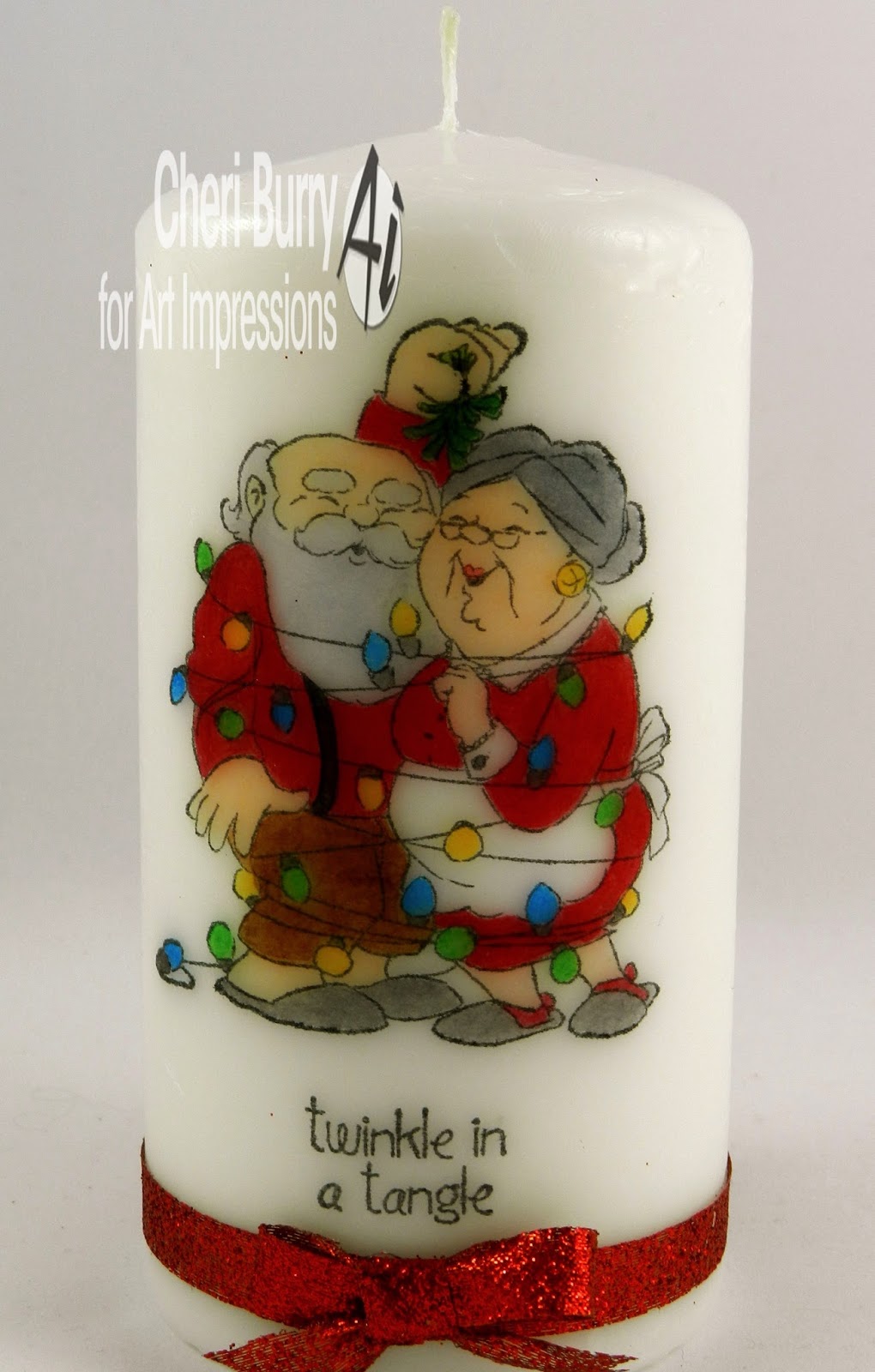
Happy Friday! Today's post is using the super cute Mr & Mrs Claus stamp image called "Twinkle In A Tangle" (#4665). I made a cute candle and matching card which will make a nice gift for that someone special!
I used paper from the Photo Play Dear Santa 6x6 collection. I added a red doily behind the popped up image which makes their outfits pop! A bit of twine, Stickles on the lights and a gem embellishment finish off my card!
The candle was actually easier to make than I thought! Stamp your image on a piece of tissue paper, and colour as usual. I did find that you couldn't really add your different markers for shadows etc, and you needed to make your colours a bit darker than usual as when applied the colours aren't as bright. After you have finished colouring cut out fairly close to your image. Lay your image on the candle and put a piece of wax paper on top. Using your heat gun heat the image. You will see the tissue paper disappear as it heats. Peel back the wax paper and voila your done! Easy peasy!! I did 2 images like this and put one on each side of the candle.
I used the Art Impressions sentiment called "The Season" (#4167).
 Copics Used:
Skin: E51, E11, E33, R20
Hair: C1, C3, C5
Reds: R24, R27, R29
Pants: E33, E35, E37
Slippers: C1, C3, C5 / E31, E33, E35
Mistletoe: G24, G28
Lights: G24, Y19, B04
** for the candle I used the midtones of each category

Thanks for stoping by today! Have a great weekend and.....
Happy Stamping!
Supplies: